Hotel Lobby AI Video: Put Two Faces on One Mic

Add one selfie per person and this hotel lobby AI video maker builds the orange studio, the mic and the rap around you. Choose a shape, then wait a few minutes.

1Add two photos

2Quality & length768p · 15s · 9:1660 credits

No subscription · Ready in about 3 minutes · Not charged if it fails

WHAT IT IS

What Is the Hotel Lobby AI Video Trend?

Picture two people in a glowing orange booth, passing one microphone that dangles from the ceiling and rapping in turns. That image comes from a COLORS performance of the song "Hotel Lobby" by Quavo and Takeoff, recorded together as Unc & Phew. Because of that, people also search for it as the Migos AI trend, the hotel lobby trend or the hotel lobby video. This site is independent. It has no connection to the artists, Migos or COLORS, and any photo you upload must be one you have the right to use. In September 2026 TikTok filled up with clips that drop friends, partners and pets into the booth. A hotel lobby AI video is not a simple face swap: the whole scene is rendered fresh from your two photos, so the booth, the mic, the moves and the sound arrive ready made.

Start My Hotel Lobby AI Video
HOW TO MAKE IT

How to Make a Hotel Lobby AI Video

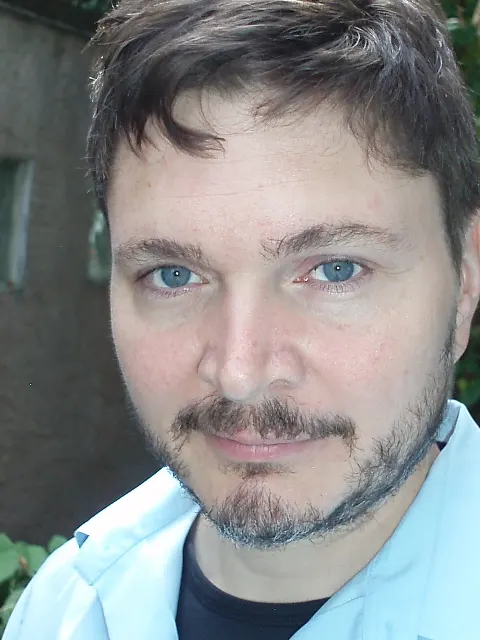
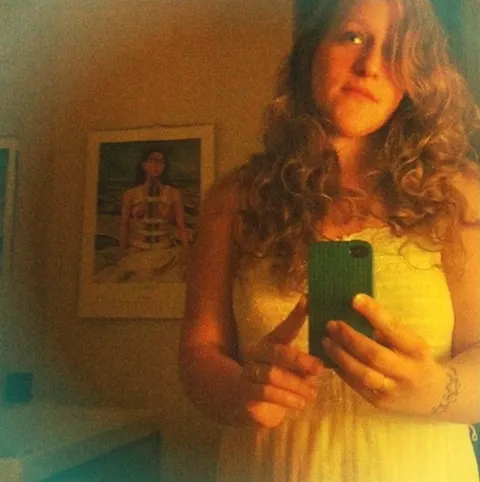
Three steps, shown with the exact two photos we uploaded and the hotel lobby AI videos that came back, untouched. Neither photo is a studio shot: one is a close-up selfie, the other a dim mirror selfie with a phone in hand.

1Upload two solo photos

Left Person
Left PersonClose-up selfie. Only the collar of the shirt is visible.
Right Person
Right PersonMirror selfie in a dark room, phone covering part of the body.

2Pick the shape

9:16 or 16:9, 768p, 15 seconds. Press generate and keep the page open for 2 to 3 minutes.

3Download the video with sound

Take 115 s · 768p · with sound · 60 credits
Take 215 s · 768p · with sound · 60 credits

What the AI kept and what it filled in

  • Faces and hair come straight from your photos, and the left photo always stays on the left.
  • Clothes follow what the photo shows. From a collar it guessed a full light blue shirt; from the mirror shot it kept the white dress.
  • Bad light is fixed. The dark mirror selfie comes out evenly lit in the orange studio.
  • The phone, the bedroom and the background disappear. The studio, the mic, the moves and the sound come from the template.

Every render is a little different. If the first one looks off, run it again before you change photos.

Pair Idea 01

You and Your Best Friend

Where most people begin

The classic hotel lobby AI video is you in one spot and your closest friend in the other. Pick a solo selfie of each, place them in the two boxes and press the button. Hair, faces and outfits carry over, so the clip looks like the two of you and not a pair of strangers. Send it to the group chat before you post it; the reactions are half the point.

  • One selfie per person
  • Faces and clothes come from your photos
  • The clip arrives with sound, ready to post

Pair Idea 02

Partners and Couples

A short clip for two

Couples turn a hotel lobby AI video into an anniversary post or a running joke. Any pair works, whether that is two guys, two women or a mixed duo, because the tool never assigns roles by gender. Choose photos where you both wear the look you want on screen. Whatever you have on in the photo is what you will wear while you rap.

  • Works for any two people
  • The outfit in the photo is the outfit on screen
  • Change sides by swapping the two photos

Pair Idea 03

Siblings, Parents and Grown-Up Kids

Family in the booth

A dad with his adult son, two sisters, a mom with her daughter: family versions of this hotel lobby AI video travel well beyond TikTok, into group chats and holiday albums. The orange studio never changes, so the only variable is who stands inside it. Unexpected pairings tend to get the loudest reactions.

  • Same booth and mic for every pair
  • Surprising pairs get shared the most
  • Download it and send it anywhere

Pair Idea 04

Pets and Cartoon Characters

Yes, a dog can hold the mic

Some people cast a dog, a cat or a cartoon hero. It can work, but the results swing more than they do with human faces. A sharp, front-facing photo with the whole head in view gives the AI the best shot. When the first try looks strange, use a different photo before you decide it cannot be done.

  • Sharp, front-facing photos win
  • Results vary more than with people
  • Try another photo if the first one is off

BEFORE YOU UPLOAD

Which Photos Make a Good Hotel Lobby AI Video?

What to pick, and what quietly ruins a clip

Photos that work

  • A solo shot per box: one person for the left spot, one person for the right spot
  • Daylight or a bright room, so the face has no hard shadows
  • A look straight into the camera, which keeps the face closest to the real you
  • Head and shoulders in frame, with the top you want to wear clearly visible

What to skip

  • Group photos: two faces in one box leave the AI guessing who belongs where
  • Strong backlight: a face against a bright window loses its detail
  • Tight face crops, when you care about the outfit: it still runs, but the tool must invent your clothes
  • Quitting after a single render: every attempt differs, so retry before changing photos
Start My Hotel Lobby AI Video

INSIDE THE TEMPLATE

What You Get From This Hotel Lobby AI Video Generator

01

A fixed orange booth with one hanging mic

The scene never changes: a flat orange wall like the COLORS set, one microphone on a cable between the two of you, and a camera that stays put. You write no prompt and tune no settings. Your two photos are the whole input, which keeps every hotel lobby AI video quick to start.

02

Two people, alternating lines

Whoever sits in the left box becomes the person on the left, and the right box becomes the person on the right. They lean toward the mic in turn with confident hand gestures, and their faces stay distinct from each other.

03

Any shape, 15 seconds

Choose vertical 9:16 for TikTok and Reels, wide 16:9 like the original, or square. Each hotel lobby AI video runs 15 seconds at 768p, and the button shows the price before you commit. A 15-second clip costs 60 credits.

04

Music and voices arrive inside the file

The clip comes back with a beat and two voices that line up with the movement. Download it and post. You do not need to add a sound afterwards.

Hotel Lobby AI Video FAQ

Short answers before your first clip.

Start My Hotel Lobby AI Video
What do I need to make a hotel lobby AI video?

Two photos, each with one person in it. Put one in the left box and one in the right box, press the button and sign in. Your clip is ready in about 2 to 3 minutes.

What does a hotel lobby AI video cost?

Each hotel lobby AI video is paid in credits. A 15-second clip is 60 credits at 768p. The button shows the exact amount. Plans start at $7.99 a month for 200 credits, enough for 3 clips of 15 seconds.

Do I have to install an app?

No. This page runs in your phone browser. Pick photos from your camera roll, press the button and save the clip straight to your phone.

Is there a hotel lobby filter inside TikTok or CapCut?

Not a tap-on filter. What people call the hotel lobby AI filter is really a clip made by an AI video maker like this one. You add two photos, get a full video with sound and then post it to TikTok or open it in CapCut.

Is this the Migos AI trend?

It is the same trend under another name. The Migos AI trend, the COLORS AI trend and the hotel lobby trend all describe two people placed in the orange booth from the Quavo and Takeoff performance. This site is independent and has no tie to the artists, Migos or COLORS. Use only photos you have the right to use.

Does the template cost extra?

No separate charge. The booth, the mic and the moves are built in, so there is no prompt to write or buy. The only cost is the video itself, starting at 60 credits for 15 seconds.

How many photos does a clip need?

Two, one per spot. Each should show a single person. An ordinary selfie is enough, as the example above shows.

Will my clip have sound?

Yes. The file includes a beat and two voices matched to the movement. The audio is generated by the AI for this scene. It is not a copy of the song, and this page does not carry the lyrics.

Can two women or two men star in it?

Yes. Any two people work in any mix. Put whoever you like on the left and on the right.

Where can I compare plans before I buy?

On the pricing page, which lists every plan and how many clips each one covers. Credits work the same on all plans, so only the size of the balance differs. See the pricing page before you start.

How long does a render take?

Most take 2 to 3 minutes. Keep the tab open, and the finished video shows up right under the button.

Can I use a pet or a cartoon?

You can try. Sharp, front-facing photos give the best result, but pets and cartoons vary more than people do. If the first clip looks off, try a second photo.

Can I post it to TikTok, Instagram or YouTube Shorts?

Yes. The file downloads straight to your phone with sound included. Choose vertical 9:16 before you start and it fills the screen on TikTok, Reels and Shorts.

What happens to my photos?

They are used only to build your clip. Videos are private by default and stay out of any public gallery. You can choose to share one later.

Can I reuse the same photos?

Yes. Upload them again, or change the shape and run a new clip. Each render is different, so the same two photos can give you a fresh hotel lobby AI video every time. Every run uses credits, so pick the length that suits you.

How many hotel lobby AI videos can $7.99 make?

The $7.99 plan includes 200 credits a month. That covers 3 clips of 15 seconds. Compare the larger plans before you pick.

Is this the only video you can make here?

No. This hotel lobby AI video page is one of the templates on RumpelstiltskinAI. The RumpelstiltskinAI home page is where the original tiptoe video lives, and it uses the same account and credits as this page.

Your Hotel Lobby AI Video Is Two Photos Away

Pick two selfies and press go.

One orange booth, one mic and the two of you, with sound already in the file. Save it and post it.

Make My Clip

60 CREDITS · SOUND INCLUDED · NO APP

Your Hotel Lobby AI Video Is Two Photos Away

Start My Hotel Lobby AI Video