Kling Motion Control
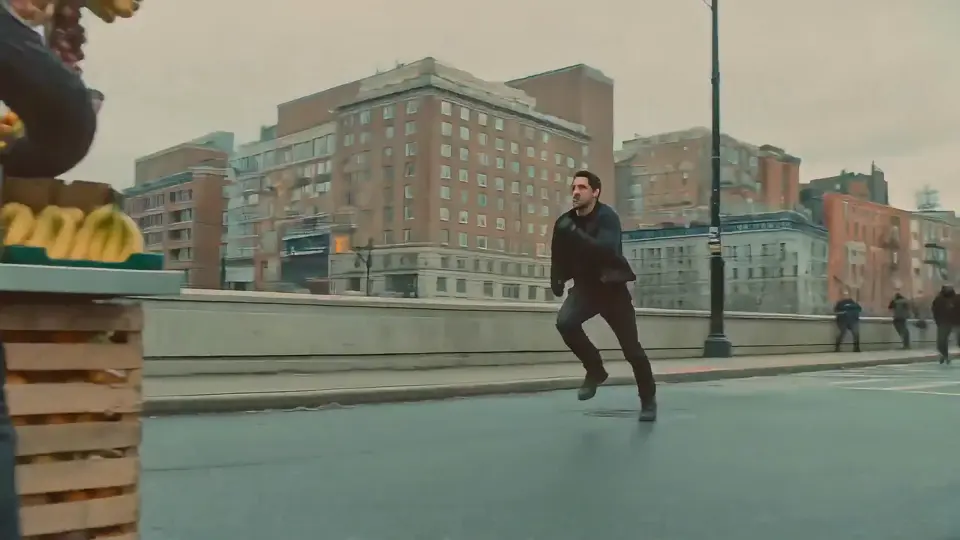
This sample leans into directed motion and sequencing, the kind of clip teams use when timing and scene progression matter.
kling-style motionstoryboardsequence
This page is for comparison intent, not benchmark theater. Kling 3 is a strong fit when teams care about expressive motion and fast iteration. Seedance 2 is a better fit when the brief leans toward polish, premium presentation, and more controlled visual finish. Ricebowl AI lets teams evaluate both paths without splitting the workflow.
These examples are selected to show the kinds of differences teams actually care about when choosing between motion-first and polish-first output.
This sample leans into directed motion and sequencing, the kind of clip teams use when timing and scene progression matter.
This sample emphasizes premium finish and visual stability, useful when the brief cares about polished presentation.
A character-led clip highlights where expressive motion and punchier pacing become part of the selection decision.
Kling 3 is the better fit when teams want to explore scene progression, expressive motion, or punchier sequencing while they are still shaping the creative direction.
Seedance 2 fits teams that care more about presentation quality, controlled composition, and a cleaner premium feel once the creative direction is already narrower.
Most teams do not need a permanent favorite model. They need the right tool for the current job. Compare the page, test a prompt in the generator, then decide based on what the campaign or story actually needs.
Save 30% billed annually
Flexible monthly subscription.
The cheapest way to start. Every model, a small monthly budget.
$12.99/mo
Renews monthly, cancel anytime.
400 credits
≈ 1–20 videos, depending on length
≈ 28–133 images, depending on the model
3.25¢ / credit
A few sneaky tiptoe clips a month for you and your friends.
$29.9/mo
Renews monthly, cancel anytime.
1,000 credits
≈ 3–50 videos, depending on length
≈ 71–333 images, depending on the model
2.99¢ / credit
2 parallel tasks
Steady output for a creator account riding the trend.
$49.9/mo
Renews monthly, cancel anytime.
2,000 credits
≈ 6–100 videos, depending on length
≈ 142–666 images, depending on the model
2.50¢ / credit
3 parallel tasks
High volume for pages and agencies posting every day.
$89.9/mo
Renews monthly, cancel anytime.
5,000 credits
≈ 15–250 videos, depending on length
≈ 357–1666 images, depending on the model
1.80¢ / credit
5 parallel tasks
Videos you can generate at the base rate. A 10-second clip costs twice as much as a 5-second one.
| Video models | Credits / video | Lite Monthly400 credits | Starter Monthly1,000 credits | Standard Monthly2,000 credits | Advanced Monthly5,000 credits |
|---|---|---|---|---|---|
| MiniMax H3 | 20 | 20 | 50 | 100 | 250 |
| Seedance 1.5 Pro | 30 | 13 | 33 | 66 | 166 |
| Grok Imagine 1.5 | 30 | 13 | 33 | 66 | 166 |
| Seedance 2.0 Mini | 45 | 8 | 22 | 44 | 111 |
| Veo 3.1 | 45 | 8 | 22 | 44 | 111 |
| Veo 3.1 Fast | 60 | 6 | 16 | 33 | 83 |
| Kling 3 Fast | 70 | 5 | 14 | 28 | 71 |
| Gemini Omni | 75 | 5 | 13 | 26 | 66 |
| Kling 3.0 Turbo | 90 | 4 | 11 | 22 | 55 |
| HappyHorse 1.1 | 115 | 3 | 8 | 17 | 43 |
| PixVerse V6 | 115 | 3 | 8 | 17 | 43 |
| Seedance 2.0 Fast | 125 | 3 | 8 | 16 | 40 |
| Kling 3 Omni | 130 | 3 | 7 | 15 | 38 |
| Kling Motion Control 3.0 | 135 | 2 | 7 | 14 | 37 |
| HappyHorse 1.0 | 140 | 2 | 7 | 14 | 35 |
| Veo 3.1 Pro | 145 | 2 | 6 | 13 | 34 |
| Seedance 2.0 | 205 | 1 | 4 | 9 | 24 |
| Seedance 2.5 | 315 | 1 | 3 | 6 | 15 |
| Image models | Credits / image | Lite Monthly400 credits | Starter Monthly1,000 credits | Standard Monthly2,000 credits | Advanced Monthly5,000 credits |
|---|---|---|---|---|---|
| GPT Image 2.5 Flare | 3 | 133 | 333 | 666 | 1,666 |
| GPT Image 2.5 Sunburst | 3 | 133 | 333 | 666 | 1,666 |
| GPT Image 1.5 | 5 | 80 | 200 | 400 | 1,000 |
| Nano Banana | 5 | 80 | 200 | 400 | 1,000 |
| Nano Banana 2 Lite | 5 | 80 | 200 | 400 | 1,000 |
| Qwen Image 3.0 | 5 | 80 | 200 | 400 | 1,000 |
| Wan 2.7 Image | 5 | 80 | 200 | 400 | 1,000 |
| Z-Image Turbo | 5 | 80 | 200 | 400 | 1,000 |
| FLUX.2 Pro | 5 | 80 | 200 | 400 | 1,000 |
| GPT Image 2 | 6 | 66 | 166 | 333 | 833 |
| Seedream 5.0 Lite | 6 | 66 | 166 | 333 | 833 |
| Qwen Image 2.0 | 6 | 66 | 166 | 333 | 833 |
| Seedream 5.0 Pro | 7 | 57 | 142 | 285 | 714 |
| Seedream 4.5 | 7 | 57 | 142 | 285 | 714 |
| Qwen Image 3.0 Pro | 7 | 57 | 142 | 285 | 714 |
| Nano Banana Pro | 8 | 50 | 125 | 250 | 625 |
| Nano Banana 2 | 8 | 50 | 125 | 250 | 625 |
| Wan 2.7 Image Pro | 12 | 33 | 83 | 166 | 416 |
| FLUX.2 Flex | 14 | 28 | 71 | 142 | 357 |
Every paid plan makes the same videos. Only the credit budget differs.
Pay yearly and save more.
A few sneaky tiptoe clips a month for you and your friends.
$19.9/mo$29.9
Billed yearly at $238.8. Renews yearly, cancel anytime.
Save $120/yr vs monthly
12,000 credits
≈ 38–600 videos, depending on length
≈ 857–4000 images, depending on the model
1.99¢ / credit
2 parallel tasks
Steady output for a creator account riding the trend.
$34.9/mo$49.9
Billed yearly at $418.8. Renews yearly, cancel anytime.
Save $180/yr vs monthly
24,000 credits
≈ 76–1200 videos, depending on length
≈ 1714–8000 images, depending on the model
1.75¢ / credit
3 parallel tasks
High volume for pages and agencies posting every day.
$62.9/mo$89.9
Billed yearly at $754.8. Renews yearly, cancel anytime.
Save $324/yr vs monthly
60,000 credits
≈ 190–3000 videos, depending on length
≈ 4285–20000 images, depending on the model
1.26¢ / credit
5 parallel tasks
Videos you can generate at the base rate. A 10-second clip costs twice as much as a 5-second one.
| Video models | Credits / video | Starter Yearly12,000 credits | Standard Yearly24,000 credits | Advanced Yearly60,000 credits |
|---|---|---|---|---|
| MiniMax H3 | 20 | 600 | 1,200 | 3,000 |
| Seedance 1.5 Pro | 30 | 400 | 800 | 2,000 |
| Grok Imagine 1.5 | 30 | 400 | 800 | 2,000 |
| Seedance 2.0 Mini | 45 | 266 | 533 | 1,333 |
| Veo 3.1 | 45 | 266 | 533 | 1,333 |
| Veo 3.1 Fast | 60 | 200 | 400 | 1,000 |
| Kling 3 Fast | 70 | 171 | 342 | 857 |
| Gemini Omni | 75 | 160 | 320 | 800 |
| Kling 3.0 Turbo | 90 | 133 | 266 | 666 |
| HappyHorse 1.1 | 115 | 104 | 208 | 521 |
| PixVerse V6 | 115 | 104 | 208 | 521 |
| Seedance 2.0 Fast | 125 | 96 | 192 | 480 |
| Kling 3 Omni | 130 | 92 | 184 | 461 |
| Kling Motion Control 3.0 | 135 | 88 | 177 | 444 |
| HappyHorse 1.0 | 140 | 85 | 171 | 428 |
| Veo 3.1 Pro | 145 | 82 | 165 | 413 |
| Seedance 2.0 | 205 | 58 | 117 | 292 |
| Seedance 2.5 | 315 | 38 | 76 | 190 |
| Image models | Credits / image | Starter Yearly12,000 credits | Standard Yearly24,000 credits | Advanced Yearly60,000 credits |
|---|---|---|---|---|
| GPT Image 2.5 Flare | 3 | 4,000 | 8,000 | 20,000 |
| GPT Image 2.5 Sunburst | 3 | 4,000 | 8,000 | 20,000 |
| GPT Image 1.5 | 5 | 2,400 | 4,800 | 12,000 |
| Nano Banana | 5 | 2,400 | 4,800 | 12,000 |
| Nano Banana 2 Lite | 5 | 2,400 | 4,800 | 12,000 |
| Qwen Image 3.0 | 5 | 2,400 | 4,800 | 12,000 |
| Wan 2.7 Image | 5 | 2,400 | 4,800 | 12,000 |
| Z-Image Turbo | 5 | 2,400 | 4,800 | 12,000 |
| FLUX.2 Pro | 5 | 2,400 | 4,800 | 12,000 |
| GPT Image 2 | 6 | 2,000 | 4,000 | 10,000 |
| Seedream 5.0 Lite | 6 | 2,000 | 4,000 | 10,000 |
| Qwen Image 2.0 | 6 | 2,000 | 4,000 | 10,000 |
| Seedream 5.0 Pro | 7 | 1,714 | 3,428 | 8,571 |
| Seedream 4.5 | 7 | 1,714 | 3,428 | 8,571 |
| Qwen Image 3.0 Pro | 7 | 1,714 | 3,428 | 8,571 |
| Nano Banana Pro | 8 | 1,500 | 3,000 | 7,500 |
| Nano Banana 2 | 8 | 1,500 | 3,000 | 7,500 |
| Wan 2.7 Image Pro | 12 | 1,000 | 2,000 | 5,000 |
| FLUX.2 Flex | 14 | 857 | 1,714 | 4,285 |
Every paid plan makes the same videos. Only the credit budget differs.
Top up credits valid for 12 months.
One-time top-up — perfect for occasional needs.
$49.9
One-time purchase, valid 12 months.
1,000 credits
≈ 3–50 videos, depending on length
≈ 71–333 images, depending on the model
4.99¢ / credit
Larger top-up with 20% bonus — best per-credit value for one-time buyers.
$198
One-time purchase, valid 12 months.
4,800 credits
≈ 15–240 videos, depending on length
≈ 342–1600 images, depending on the model
4.13¢ / credit
5 parallel tasks
Videos you can generate at the base rate. A 10-second clip costs twice as much as a 5-second one.
| Video models | Credits / video | Basic Pack1,000 credits | Advanced Pack4,800 credits |
|---|---|---|---|
| MiniMax H3 | 20 | 50 | 240 |
| Seedance 1.5 Pro | 30 | 33 | 160 |
| Grok Imagine 1.5 | 30 | 33 | 160 |
| Seedance 2.0 Mini | 45 | 22 | 106 |
| Veo 3.1 | 45 | 22 | 106 |
| Veo 3.1 Fast | 60 | 16 | 80 |
| Kling 3 Fast | 70 | 14 | 68 |
| Gemini Omni | 75 | 13 | 64 |
| Kling 3.0 Turbo | 90 | 11 | 53 |
| HappyHorse 1.1 | 115 | 8 | 41 |
| PixVerse V6 | 115 | 8 | 41 |
| Seedance 2.0 Fast | 125 | 8 | 38 |
| Kling 3 Omni | 130 | 7 | 36 |
| Kling Motion Control 3.0 | 135 | 7 | 35 |
| HappyHorse 1.0 | 140 | 7 | 34 |
| Veo 3.1 Pro | 145 | 6 | 33 |
| Seedance 2.0 | 205 | 4 | 23 |
| Seedance 2.5 | 315 | 3 | 15 |
| Image models | Credits / image | Basic Pack1,000 credits | Advanced Pack4,800 credits |
|---|---|---|---|
| GPT Image 2.5 Flare | 3 | 333 | 1,600 |
| GPT Image 2.5 Sunburst | 3 | 333 | 1,600 |
| GPT Image 1.5 | 5 | 200 | 960 |
| Nano Banana | 5 | 200 | 960 |
| Nano Banana 2 Lite | 5 | 200 | 960 |
| Qwen Image 3.0 | 5 | 200 | 960 |
| Wan 2.7 Image | 5 | 200 | 960 |
| Z-Image Turbo | 5 | 200 | 960 |
| FLUX.2 Pro | 5 | 200 | 960 |
| GPT Image 2 | 6 | 166 | 800 |
| Seedream 5.0 Lite | 6 | 166 | 800 |
| Qwen Image 2.0 | 6 | 166 | 800 |
| Seedream 5.0 Pro | 7 | 142 | 685 |
| Seedream 4.5 | 7 | 142 | 685 |
| Qwen Image 3.0 Pro | 7 | 142 | 685 |
| Nano Banana Pro | 8 | 125 | 600 |
| Nano Banana 2 | 8 | 125 | 600 |
| Wan 2.7 Image Pro | 12 | 83 | 400 |
| FLUX.2 Flex | 14 | 71 | 342 |
Every paid plan makes the same videos. Only the credit budget differs.
Browse all
No. This page avoids unstable claims and focuses on the more durable question: which model direction fits the brief and workflow better.
Not necessarily. Many teams switch depending on the brief. Comparison intent is usually about choosing the right direction for this project, not declaring a permanent winner.
Open the generator, run a prompt that matches your real brief, and compare the output style before you decide on pricing or production flow.
Use the comparison to shorten the decision, then validate the brief in the generator instead of staying stuck in model debate.